July 2026 Insights

Welcome to the July Edition of Tech Aid Insights
Technology is changing quickly, and so are the questions people are asking.
This month I've been helping people across Fiordland understand a new online scam that's appearing on more websites, along with one of the questions I hear most often:
"Is my phone really listening to me?"
You'll also find a simple privacy tip to help you review your app permissions and details about this month's free Tech Aid Drop-In Sessions.
Whether you've received this month's newsletter in your inbox or found this page while searching for answers online, I hope you find something useful.
In this month's edition
Learn how to spot fake CAPTCHA scams.
Find out why your phone sometimes seems to know what you're've been talking about.
Review your app permissions in just a few minutes.
Join us at this month's free Tech Aid Drop-In Sessions.
Prefer to read the newsletter? Download the printable July edition (PDF).
-
Scam to Watch: Fake "I'm Not a Robot" CAPTCHA Scams – How to Stay Safe Online
We've all seen the little "I'm not a robot" checkboxes that appear before visiting a website. These security checks, known as CAPTCHAs, help protect websites from spam and automated attacks and are usually perfectly safe.
Unfortunately, cybercriminals are now creating fake CAPTCHA pages that look genuine but are designed to trick people into downloading harmful software onto their computer.
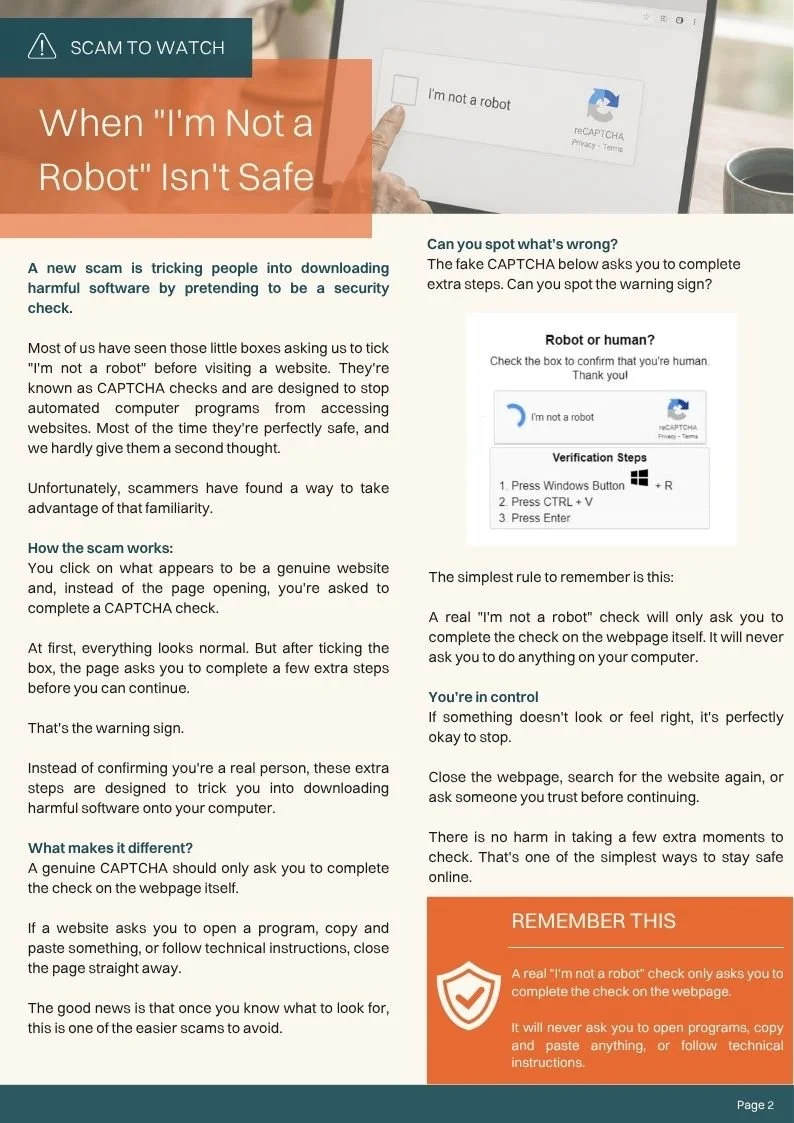
The scam often begins with what appears to be a normal website. Instead of opening the page, you're asked to complete a CAPTCHA check. After ticking the box, you're then instructed to follow additional steps such as pressing keyboard shortcuts, opening programs, or copying and pasting text.
That's the warning sign.
A legitimate CAPTCHA only verifies that you're a real person on the webpage itself. It will never ask you to change computer settings, run commands, or install software.
How to spot a fake CAPTCHA
It asks you to press keyboard shortcuts.
It tells you to copy and paste text.
It asks you to open another program.
It asks you to download software before continuing.
If something doesn't feel right, close the webpage and search for the website again rather than following the instructions.
As online scams become more sophisticated, taking an extra few seconds before clicking is one of the simplest ways to stay safe.ption text goes here
-
One of the questions I've been asked most recently is:
"Why do adverts appear for something I've only just been talking about?"
It's a great question—and it's easy to understand why people wonder if their phone has been listening.
In reality, the answer is usually more about the information we share every day than our phone secretly recording our conversations.
Advertisers and online services build a picture of our interests using many different signals, including:
Websites we visit
Things we search for
Videos we watch
Online shopping
Apps we use
Our approximate location (if we've allowed it)
Some apps can also access your microphone if you've given them permission, particularly apps designed for phone calls, video meetings or voice recordings.
When all of this information is combined, adverts can sometimes feel remarkably accurate—even when your phone hasn't been listening.
The good news is that you have control. Reviewing your privacy settings and app permissions every few months is a simple way to better understand what information your phone is sharing.
If you're unsure where to start, bring your phone along to one of our free Tech Aid Drop-In Sessions and we'll check it together.
-
How to Review App Permissions on iPhone and Android
Most apps don't need access to everything on your phone.
Reviewing your app permissions every few months is a quick and easy way to improve your privacy and keep control over what information your apps can access.
On both iPhone and Android, open:
Settings → Privacy (or Privacy & Security)
Then check which apps have access to:
Microphone
Location
Camera
Photos
Ask yourself:
Does this app really need this permission to do its job?
If the answer is no, you can safely turn that permission off. If the app genuinely needs access later, it will simply ask you again.
Taking just five minutes to review your privacy settings is one of the easiest ways to improve your online security.
-
Need help with your phone, laptop, email, passwords or online accounts?
Tech Aid's free Drop-In Sessions are a relaxed place to ask questions, solve technology problems and build confidence using your devices.
Whether you're setting up a new phone, trying to understand cloud storage, worried about an email that might be a scam, or simply want someone to explain something in plain English, you're welcome to come along.
Location
Fiordland Community HouseWhen
4 & 18 AugustTime
10.00am – 12.00pmNo bookings are needed—just bring your device and your questions.
These sessions are proudly supported through community funding to help make technology more accessible for everyone across Fiordland.
This Month’s Printable Edition
Prefer the printable version?
You can download or browse the full July edition below.